Saltar al contenido
BOJ Flow Suite

Herramientas visuales para NinjaTrader 8Visual tools for NinjaTrader 8

Menos información dispersa. Más contexto en una sola gráfica. Less scattered information. More context on a single chart.

BOJ Flow Suite ordena sobre la gráfica de NinjaTrader 8 las noticias económicas, las sesiones de mercado y tu propia configuración de cuenta y riesgo. No opera por ti ni sustituye tu criterio. Pone delante lo que necesitas mirar antes de decidir. BOJ Flow Suite organises economic news, market sessions and your own account and risk setup right on the NinjaTrader 8 chart. It does not trade for you and it does not replace your judgement. It puts in front of you what you need to look at before deciding.

BOJ Flow Watch se distribuye con licencia de NinjaTrader Vendor Licensing. Nos dejas el correo de tu cuenta de NinjaTrader, descargas el archivo al momento y activamos tu licencia en menos de 24 horas. Hasta entonces el indicador se instala, pero no carga. BOJ Flow Watch is distributed under NinjaTrader Vendor Licensing. Leave us the email of your NinjaTrader account, download the file right away and we activate your licence within 24 hours. Until then the indicator installs but does not load.

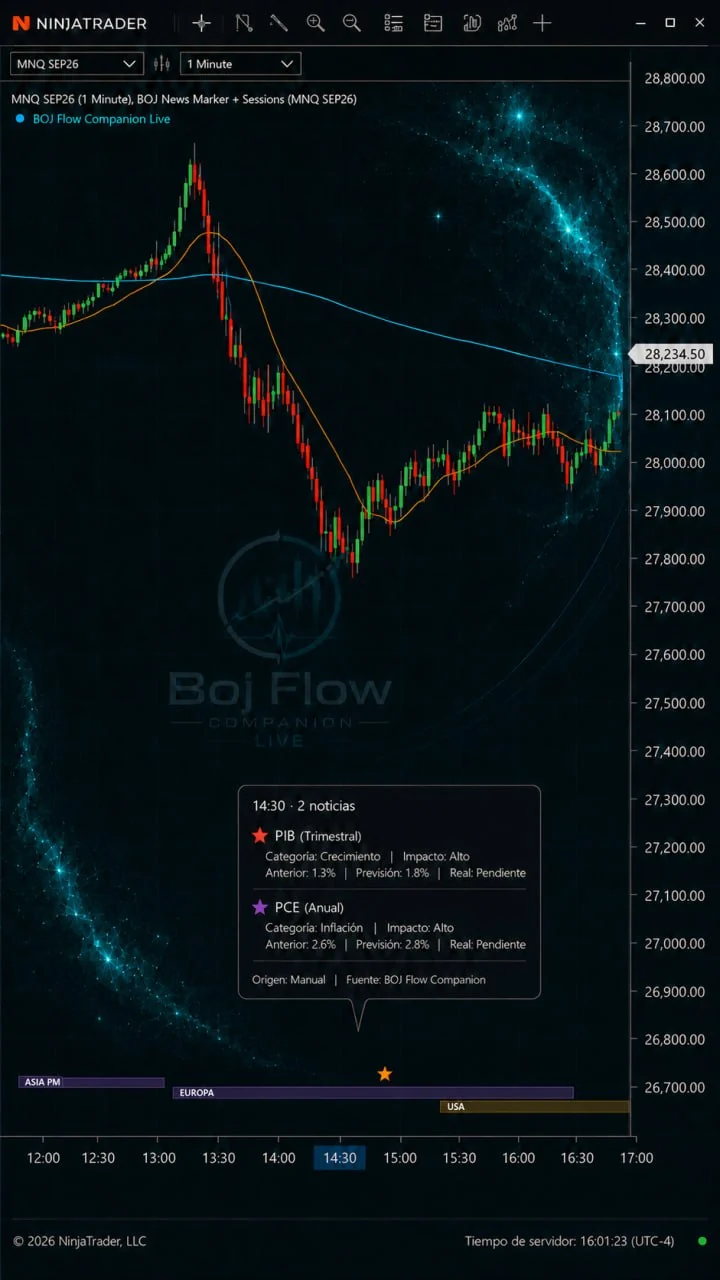
Gráfica de NinjaTrader 8 con las estrellas de noticias económicas, la información emergente de PIB y PCE y las cintas de sesión de Asia, Europa y Estados Unidos
Fuentes oficiales: BLS, BEA y FedOfficial sources: BLS, BEA and the Fed
Sesiones de Asia, Europa y USAAsia, Europe and US sessions
Comprobación antes de operarA check before you trade
Para NinjaTrader 8For NinjaTrader 8

Una suite por módulosA modular suite

Tres herramientas, una misma ideaThree tools, one idea

Cada módulo se instala por separado y funciona por su cuenta. Empiezas por el que es gratuito y añades el resto solo si te hace falta. Each module installs separately and works on its own. You start with the free one and add the rest only if you need them.

GratuitoFree

BOJ Flow Watch

Noticias, sesiones e inspector de cuenta y riesgo, en un solo indicador.News, sessions and an account and risk inspector, in a single indicator.

  • Noticias económicas de fuentes oficiales sobre la gráficaEconomic news from official sources, on the chart
  • Sesiones de Asia, Europa y USA con proyección de solapesAsia, Europe and US sessions with overlap projection
  • Comprobación de cuenta, mercado y riesgo antes de operarAccount, market and risk check before trading
Descargar gratisDownload for free

Lista de esperaWaiting list

BOJ Flow Companion Live

Acompaña la sesión en directo: contexto operativo, dirección dominante, estado del mercado, riesgo aproximado y módulos visuales sobre la gráfica. Versión de pago.Accompanies your session live: operating context, dominant direction, market state, approximate risk and visual modules on the chart. Paid version.

Funcionando y en fase avanzada de validación interna antes del lanzamiento. Apúntate y te escribimos el día que salga, con el precio y las funciones definitivas. Sin más correos que ese.Working and in advanced internal validation before launch. Sign up and we will write to you the day it launches, with the final price and features. No other emails.

Apuntarme a la listaJoin the list

Lista de esperaWaiting list

BOJ Flow Companion Journal

Registra la sesión: eventos, prealertas, entradas, cancelaciones, observaciones y movimientos, en un registro local para revisar y mejorar el proceso. Versión de pago.Records the session: events, pre-alerts, entries, cancellations, notes and account movements, in a local log to review and improve your process. Paid version.

Funcionando y en fase avanzada de validación interna antes del lanzamiento. Apúntate y te escribimos el día que salga, con el precio y las funciones definitivas. Sin más correos que ese.Working and in advanced internal validation before launch. Sign up and we will write to you the day it launches, with the final price and features. No other emails.

Apuntarme a la listaJoin the list

Lista de esperaWaiting list

Companion Live y Companion JournalCompanion Live and Companion Journal

Forman el núcleo operativo de la suite y están diseñados para trabajar juntos: Live ayuda a leer el contexto antes de decidir, y Journal conserva la información de la sesión para revisarla después. Ambos funcionan ya y están en fase avanzada de validación interna.They form the operating core of the suite and are designed to work together: Live helps you read the context before deciding, and Journal keeps the session data for later review. Both already work and are in advanced internal validation.

Un solo correo el día que salgan, con el precio y las funciones definitivas. Nada de secuencias ni ofertas: si no te interesa, lo borras y ya.One email the day they launch, with the final price and features. No sequences, no offers: if it is not for you, delete it and that is it.

Indicador gratuito para NinjaTrader 8Free indicator for NinjaTrader 8

BOJ Flow Watch

Tres cosas que normalmente miras por separado, en el mismo sitio: qué noticias vienen, en qué sesión estás y si lo que tienes configurado es lo que habías decidido. Three things you normally check separately, in one place: what news is coming, which session you are in, and whether your setup is what you had decided.

Noticias económicasEconomic news

Las publicaciones aparecen como estrellas debajo de la gráfica, en su hora exacta. Pasas el cursor y ves el evento.Releases appear as stars below the chart, at their exact time. Hover and you see the event.

  • Nombre, categoría, impacto, dato previo, previsión, dato real y fuenteName, category, impact, previous, forecast, actual and source
  • Filtras por impacto: alto, medio y bajoFilter by impact: high, medium and low
  • Filtras por categoría: inflación, empleo, tipos, crecimiento y discursosFilter by category: inflation, employment, rates, growth and speeches
  • Prealerta configurable, de 1 a 60 minutos antesConfigurable pre-alert, from 1 to 60 minutes before
  • Eliges cuántos días hacia atrás y hacia delante quieres verChoose how many days back and forward you want to see

De dónde salen los datos. De organismos oficiales, no de un calendario de terceros: BLS (IPC, empleo, NFP, IPP, JOLTS), BEA (PIB, PCE, balanza comercial) y Reserva Federal/FOMC. Se actualizan solas cada cierto tiempo y puedes combinarlas con un CSV propio. Where the data comes from. Official bodies, not a third-party calendar: BLS (CPI, employment, NFP, PPI, JOLTS), BEA (GDP, PCE, trade balance) and the Federal Reserve/FOMC. They refresh on their own and you can combine them with your own CSV.

Sesiones de mercadoMarket sessions

Cintas en la parte baja de la gráfica para Asia, Europa y USA. Ves qué mercado está abierto sin salir del chart.Ribbons at the bottom of the chart for Asia, Europe and the US. You see which market is open without leaving the chart.

  • Marcas de apertura y de cierre de cada sesiónOpening and closing markers for each session
  • Proyección hacia la derecha: ves el próximo solape antes de que llegueProjection to the right: you see the next overlap before it arrives
  • Activas o desactivas cada sesión por separadoTurn each session on or off separately
  • Color, altura, separación y opacidad configurablesConfigurable colour, height, spacing and opacity

Por qué importa. El precio no se comporta igual en Asia que en la apertura americana. Saber en qué sesión estás, y cuándo va a solaparse con la siguiente, es contexto que ya tenías que consultar en otro sitio. Why it matters. Price does not behave the same in Asia as at the US open. Knowing which session you are in, and when it will overlap with the next one, is context you were already checking somewhere else.

Inspector: cuenta, ATM y riesgo antes de operarInspector: account, ATM and risk before you trade

Esta parte no mira el mercado. Te mira a ti. Escribes lo que habías decidido operar y te dice si lo que tienes puesto ahora mismo coincide. This part does not look at the market. It looks at you. You write down what you had decided to trade and it tells you whether what is currently set matches.

Plan a chequearPlan to check

Cuenta, mercado, pérdida máxima en dólares, profit mínimo y número máximo de contratos. Lo rellenas una vez.Account, market, maximum loss in dollars, minimum profit and maximum number of contracts. You fill it in once.

Actual NinjaTraderCurrent NinjaTrader

Lo que tienes seleccionado en este momento: cuenta, instrumento y datos del ATM.What you have selected right now: account, instrument and ATM data.

Checkout

La comparación, línea a línea. Responde OK exacto, OK dentro de límite, incompleto o error, y te dice cuál es el error.The comparison, line by line. It answers exact OK, OK within limit, incomplete or error, and tells you which error.

Dos formas de verlo. Como ventana flotante sobre la gráfica, con el plan, los datos actuales y el Checkout completos; o integrado en el panel de ChartTrader, en resumen, junto a los botones de compra y venta. Las dos muestran lo mismo y puedes usar la que te resulte más cómoda. Two ways to see it. As a floating window over the chart, with the full plan, current data and Checkout; or embedded in the ChartTrader panel, as a summary, next to the buy and sell buttons. Both show the same information; use whichever suits you.

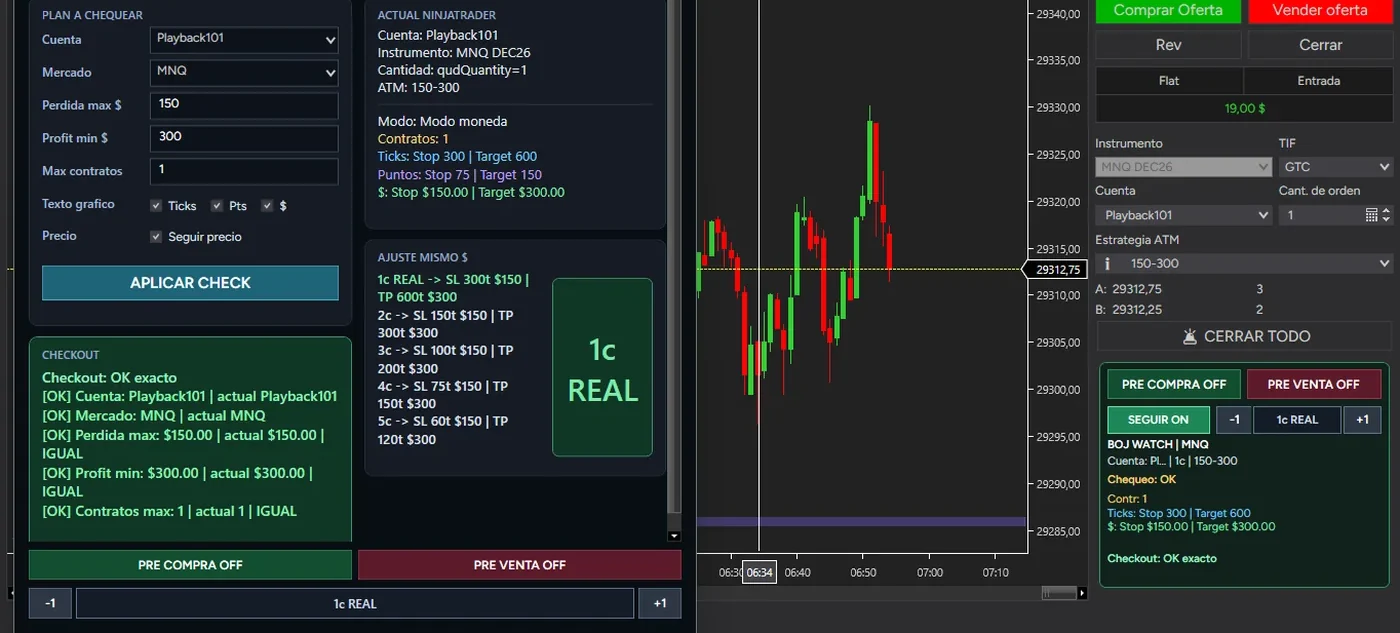
Inspector como ventana flotante sobre la gráfica de NinjaTrader, con el Plan a chequear, Actual NinjaTrader, el Checkout en verde y la columna AJUSTE MISMO $
Ventana flotante. Plan a chequear, Actual NinjaTrader y Checkout, con la columna AJUSTE MISMO $ al lado. Aquí todo cuadra: cuenta, mercado, pérdida máxima, profit mínimo y contratos, y el Checkout responde OK exacto, línea a línea. El contador grande en verde dice 1c REAL: es la cantidad que hay puesta de verdad en ChartTrader. Floating window. Plan to check, Current NinjaTrader and Checkout, with the AJUSTE MISMO $ column beside them. Here everything lines up: account, market, maximum loss, minimum profit and contracts, and the Checkout answers exact OK, line by line. The large green counter reads 1c REAL: the quantity actually set in ChartTrader.
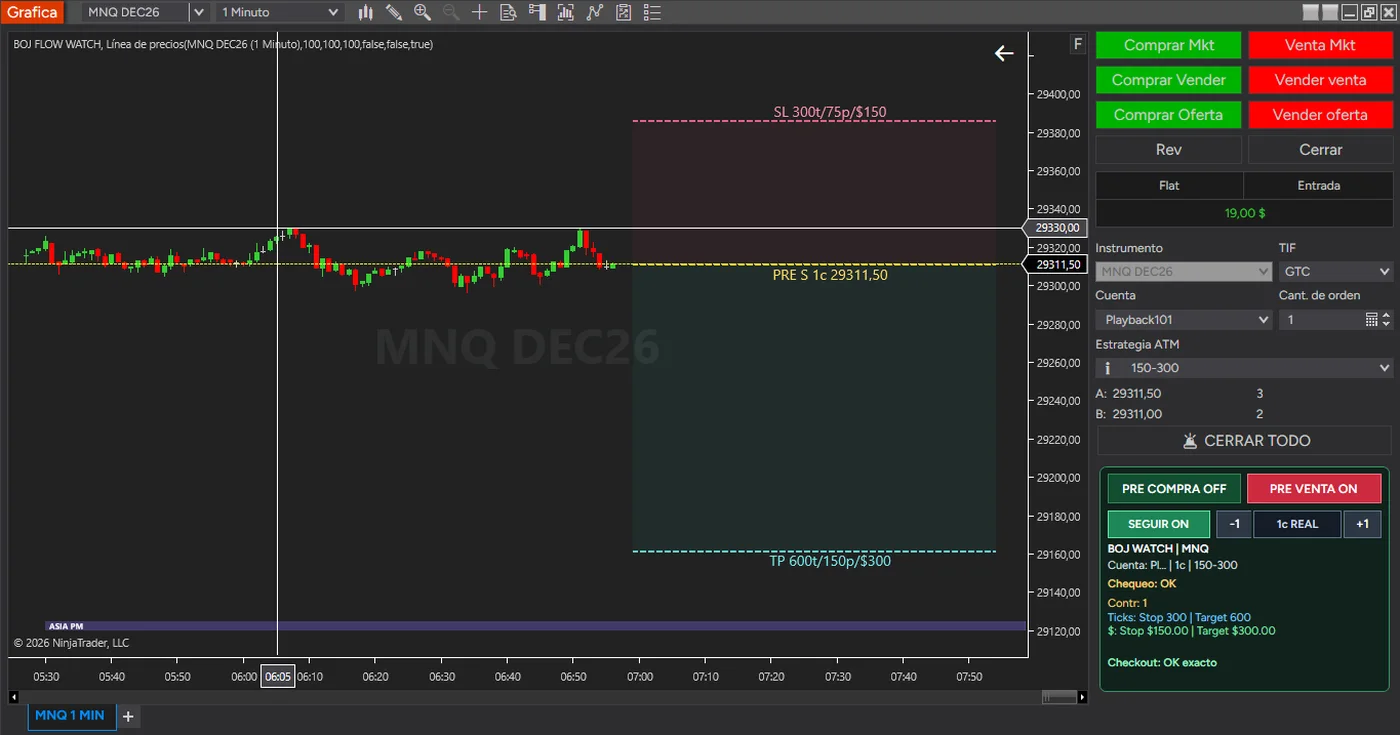
Inspector integrado en el panel de ChartTrader de NinjaTrader, con PRE VENTA encendido y la entrada, el stop y el objetivo dibujados sobre la gráfica
En el panel de ChartTrader. Los botones PRE COMPRA y PRE VENTA, SEGUIR y el resumen del Checkout, debajo de la cuenta y el ATM que tienes seleccionados. Sin abrir ninguna ventana más. Con PRE VENTA encendido, la gráfica dibuja dónde caerían la entrada, el stop (300 ticks, 75 puntos, 150 $) y el objetivo (600 ticks, 150 puntos, 300 $). Es un dibujo: no hay ninguna orden enviada. In the ChartTrader panel. The PRE COMPRA and PRE VENTA buttons, SEGUIR and the Checkout summary, right below the account and ATM you have selected. No extra window needed. With PRE VENTA on, the chart draws where the entry, the stop (300 ticks, 75 points, 150 $) and the target (600 ticks, 150 points, 300 $) would fall. It is a drawing: no order has been sent.
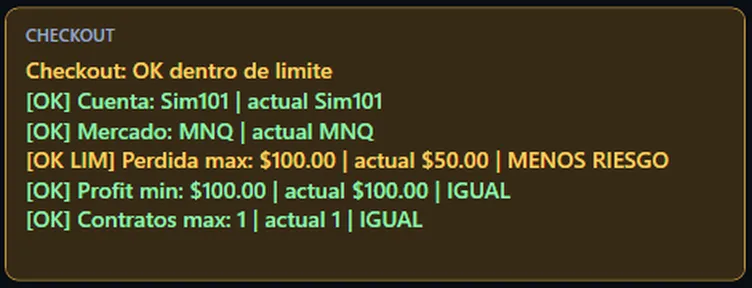
El Checkout del Inspector pasando de error por mercado distinto a OK dentro de límite
El mismo Checkout, antes y después. Con el plan puesto en NQ y la gráfica en MNQ, el Inspector marca el mercado en rojo y lo dice con todas las letras. Corriges el mercado y pasa a verde, línea a línea. Nada de esto envía una orden: solo compara lo que habías decidido con lo que tienes puesto. The same Checkout, before and after. With the plan set to NQ and the chart on MNQ, the Inspector flags the market in red and says so plainly. Fix the market and it turns green, line by line. None of this sends an order: it only compares what you decided with what you have set.

Avisa, no bloquea. Si la cuenta no es la que habías puesto, si el stop supera tu pérdida máxima o si llevas más contratos de la cuenta, lo ves antes de darle al botón. Nada te impide operar igual: la decisión sigue siendo tuya. It warns, it does not block. If the account is not the one you set, if the stop exceeds your maximum loss, or if you are carrying more contracts than planned, you see it before you hit the button. Nothing stops you from trading anyway: the decision is still yours.

Previsualización. Un botón dibuja sobre la gráfica dónde caerían la entrada, el stop y el objetivo con el ATM que tienes seleccionado, con la distancia en ticks, en puntos y en dólares. Es un dibujo: no envía ninguna orden. Preview. One button draws on the chart where the entry, stop and target would fall with the ATM you have selected, showing the distance in ticks, points and dollars. It is a drawing: it sends no order.

Tres cosas más del Inspector. Simular contratos sin tocar el ATM, ver qué stop haría falta para arriesgar el mismo dinero con más contratos, y seguir vigilando la operación una vez abierta. Three more things the Inspector does. Simulating contracts without touching the ATM, seeing what stop it would take to risk the same money with more contracts, and keeping an eye on the trade once it is open.

Contratos REAL y SIMREAL and SIM contracts

El contador tiene dos estados. En verde, REAL: el número es el que tienes puesto en ChartTrader. En amarillo, SIM: Watch está simulando otra cantidad y lo que ves en pantalla ya no coincide con lo que hay puesto. SIM no cambia ChartTrader, no modifica el ATM y no envía órdenes.The counter has two states. In green, REAL: the number matches what you have set in ChartTrader. In yellow, SIM: Watch is simulating a different quantity and what you see no longer matches what is set. SIM does not change ChartTrader, does not modify the ATM and sends no orders.

AJUSTE MISMO $

Una columna que responde a una pregunta concreta: si quisiera llevar más contratos arriesgando el mismo dinero, ¿cuánto tendría que estrechar el stop? Te da la cuenta hecha para cada cantidad. Es una comparación, no una recomendación: más contratos con menos margen no es mejor ni peor, es distinto.A column that answers one concrete question: if I wanted to carry more contracts risking the same money, how much would I have to tighten the stop? It does the arithmetic for each quantity. It is a comparison, not a recommendation: more contracts with less room is neither better nor worse, it is different.

Con la operación abiertaOnce the trade is open

Watch sigue mirando después de entrar. Si mueves el stop a breakeven o a positivo, se pinta en verde. Si se aleja hasta pasar la pérdida máxima de tu plan, aparece NO RECOMENDABLE con los dólares que te pasas, y el Checkout lo dice.Watch keeps looking after you are in. If you move the stop to breakeven or into profit, it turns green. If it drifts past your plan’s maximum loss, NO RECOMENDABLE appears with the dollars you are over by, and the Checkout says so.

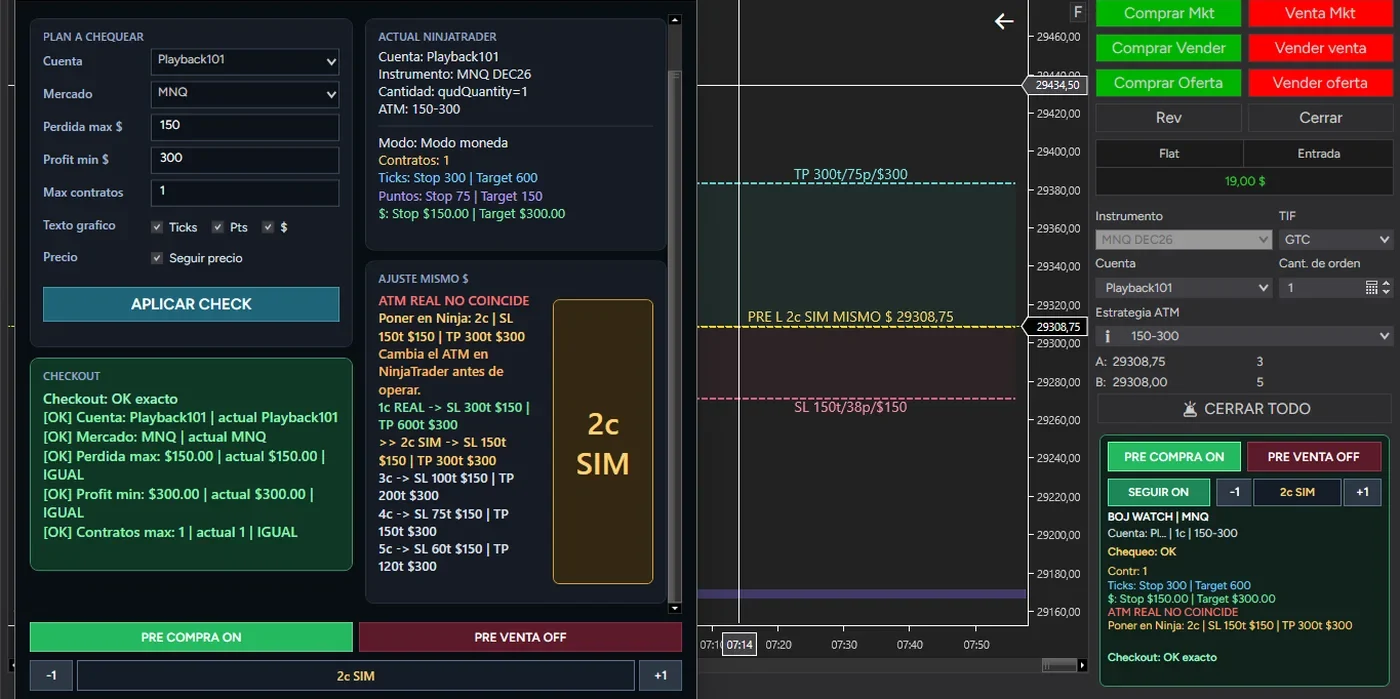
Ventana del Inspector con el contador 2c SIM en amarillo, el aviso ATM REAL NO COINCIDE y la columna AJUSTE MISMO $ con el stop recalculado para 1, 2, 3, 4 y 5 contratos
Contratos simulados y la columna de ajuste. El plan es un contrato con 150 $ de pérdida máxima y el Checkout sale OK exacto. Con 2c SIM, el contador pasa a amarillo y aparece ATM REAL NO COINCIDE. A la izquierda, AJUSTE MISMO $ desgrana el mismo riesgo: 1 contrato con stop de 300 ticks, 2 con 150, 3 con 100, 4 con 75 y 5 con 60. Los 150 $ no se mueven. La línea Poner en Ninja da los números exactos por si decides cambiarlo tú a mano. Simulated contracts and the adjustment column. The plan is one contract with a 150 $ maximum loss and the Checkout reads exact OK. With 2c SIM, the counter turns yellow and ATM REAL NO COINCIDE appears. On the left, AJUSTE MISMO $ lays out the same risk: 1 contract with a 300-tick stop, 2 with 150, 3 with 100, 4 with 75 and 5 with 60. The 150 $ does not move. The Poner en Ninja line gives the exact numbers in case you decide to change it by hand.
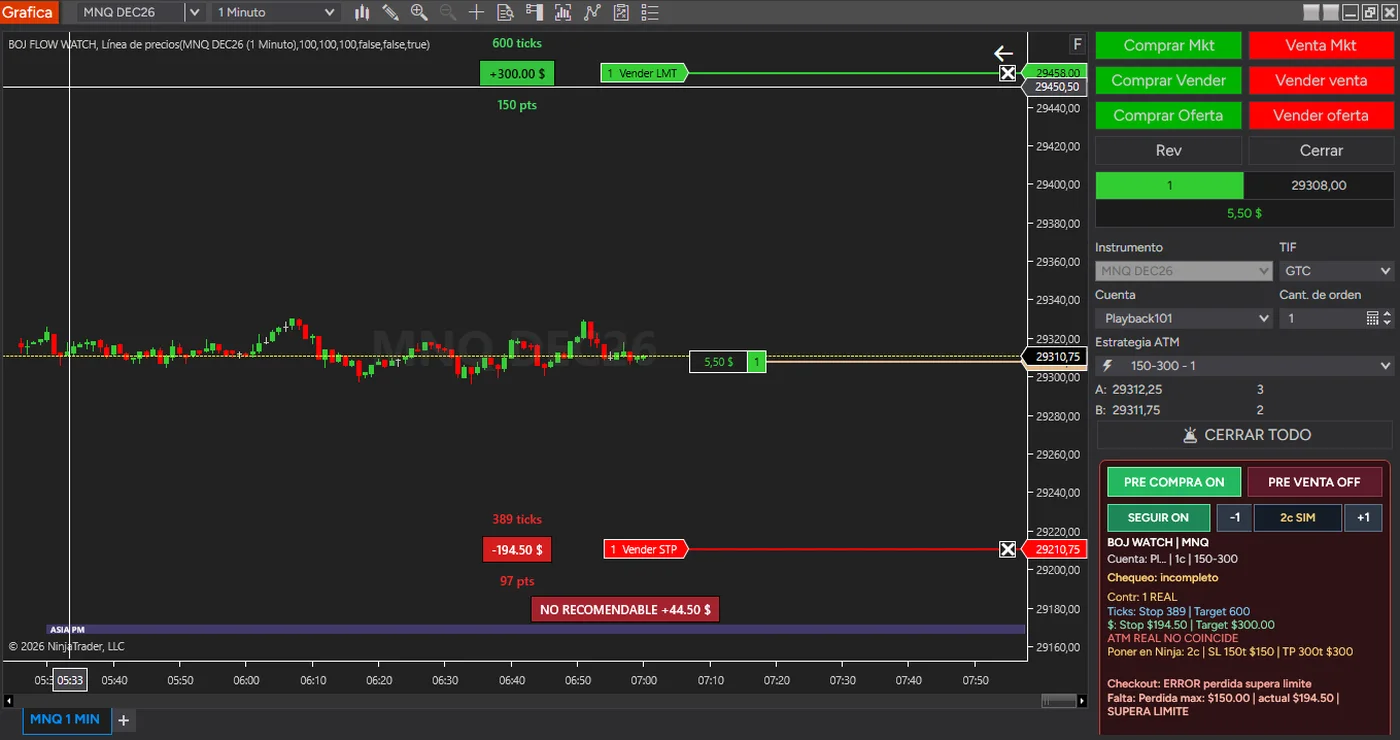
Gráfica con la operación abierta y el aviso NO RECOMENDABLE más 44,50 dólares, con el Checkout marcando que la pérdida supera el límite
El stop se ha ido lejos. El plan decía 150 $ de pérdida máxima y el stop está a 389 ticks, que son 194,50 $. Watch lo marca sobre la gráfica, NO RECOMENDABLE +44,50 $, y el Checkout lo repite: pérdida supera límite. No bloquea nada. The stop has drifted. The plan said a 150 $ maximum loss and the stop sits 389 ticks away, which is 194.50 $. Watch flags it on the chart, NO RECOMENDABLE +44.50 $, and the Checkout repeats it: loss over the limit. It blocks nothing.
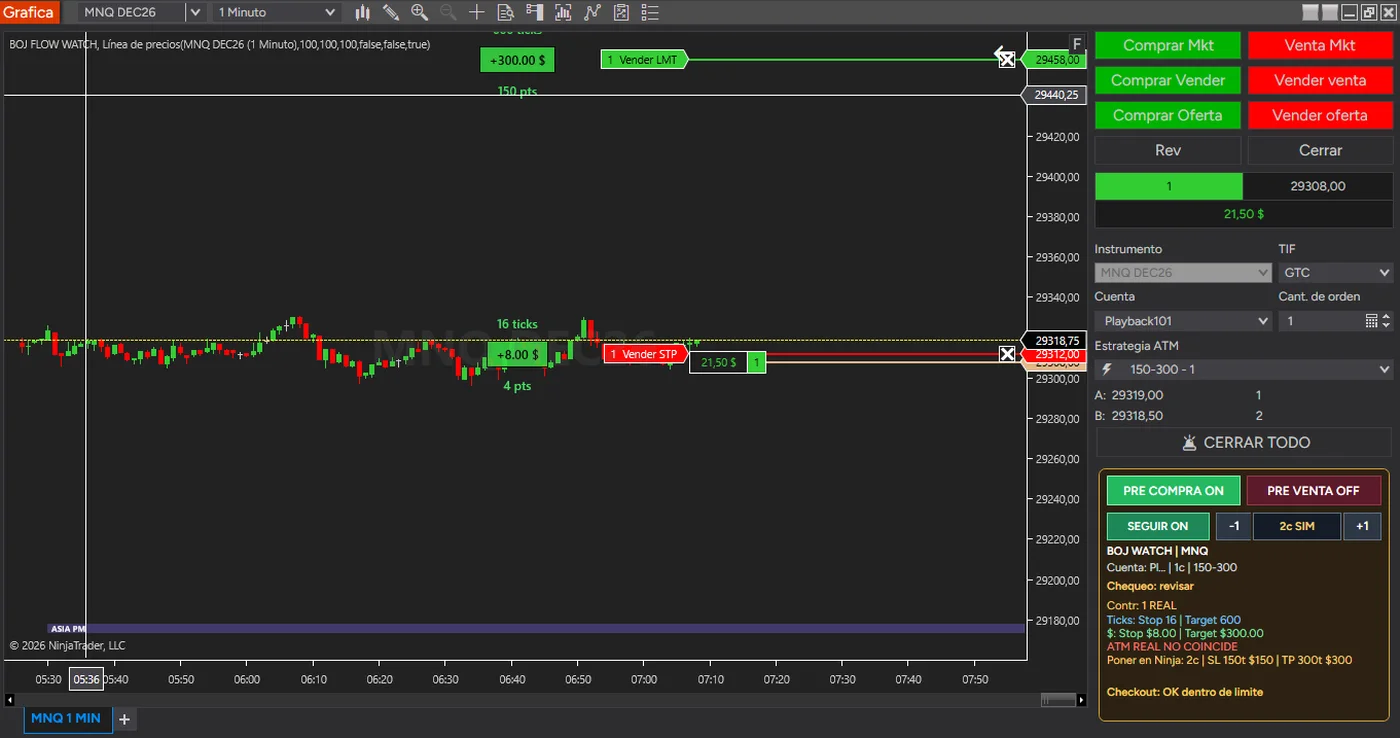
La misma operación con el stop ya en positivo, pintado en verde, y el Checkout en OK dentro de límite
El mismo trade con el stop protegido. El stop está 16 ticks por encima de la entrada, +8,00 $, y se pinta en verde. El Checkout pasa a OK dentro de límite. The same trade with the stop protected. The stop sits 16 ticks above the entry, +8.00 $, and turns green. The Checkout moves to OK within limit.

Nuevo en la 1.0.4.4. El recuadro de cuenta se dibuja sobre la gráfica y lo mueves donde quieras, el plan del Checkout ya no depende de ChartTrader, y el botón VOLVER aparece junto al aviso para pedir que el stop vuelva al ATM de la entrada. New in 1.0.4.4. The account box is drawn on the chart and you move it wherever you want, the Checkout plan no longer depends on ChartTrader, and the VOLVER button sits next to the warning to request the stop back to the entry’s ATM.

El recuadro de cuentaThe account box

Fondo negro y letras blancas, sobre la gráfica. Al cargar aparece a la derecha de la entrada y a su altura. Lo arrastras donde te convenga y le cambias el tamaño desde la esquina.Black background, white text, over the chart. It loads to the right of the entry, at its height. You drag it wherever suits you and resize it from the corner.

El plan, tuyo y vacíoThe plan, yours and empty

Cuenta, mercado, pérdida máxima, profit mínimo y contratos máximos son los valores que escribes tú, independientes de ChartTrader. Cada instancia nueva arranca con el plan vacío y lo escrito se mantiene durante esa instancia.Account, market, maximum loss, minimum profit and maximum contracts are the values you type, independent of ChartTrader. Each new instance starts with an empty plan and what you type stays for that instance.

VOLVER

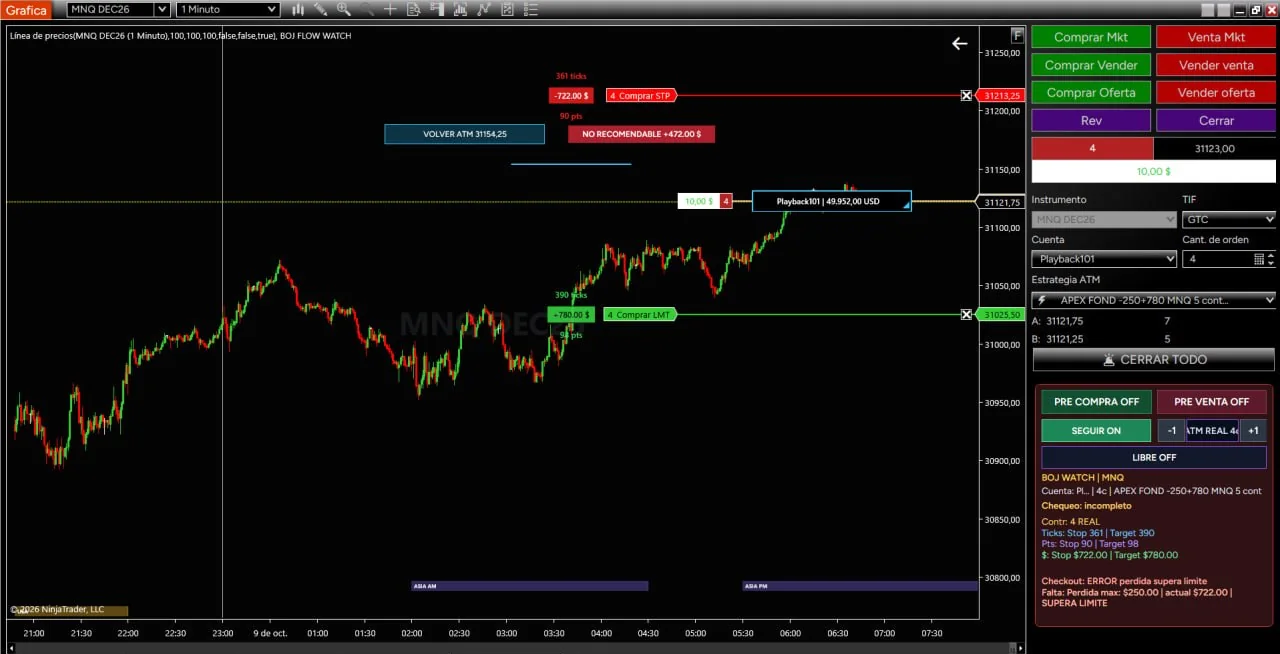
Junto al aviso NO RECOMENDABLE aparece VOLVER ATM con su precio, calculado con el ATM de la entrada. Lo pulsas tú y solicita el cambio de los stops en la cuenta que tengas seleccionada en ChartTrader y en el contrato exacto de la gráfica. La petición queda pendiente de confirmación: puede rechazarse o quedar incompleta, y entonces hay que revisar todos los stops. No actúa si ya están en el nivel o protegen mejor.Next to the NO RECOMENDABLE warning, VOLVER ATM appears with its price, worked out from the entry’s ATM. You press it and it requests the stop change on the ChartTrader account you have selected and the exact chart instrument. The request waits for confirmation: it can be rejected or left incomplete, and then every stop has to be reviewed. It does nothing if they are already at the level or protect better.

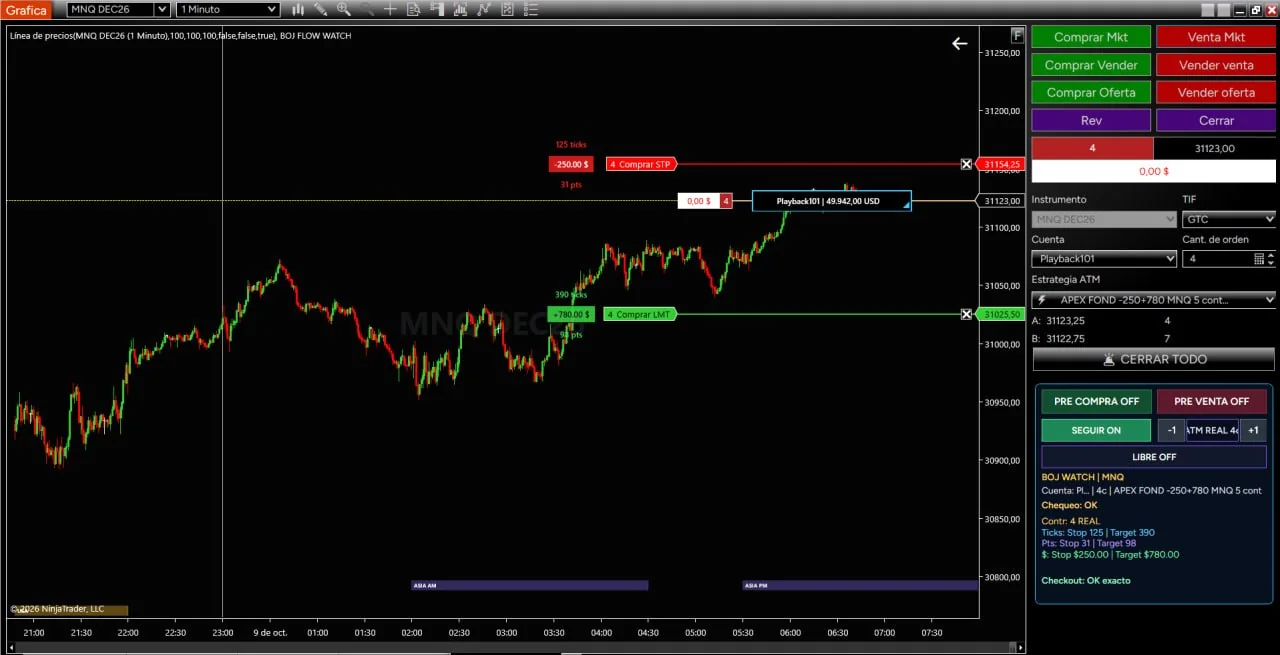
Gráfica de MNQ con el recuadro de cuenta dibujado a la derecha de la entrada y el Checkout en OK exacto
Dónde aparece. El recuadro de cuenta se coloca a la derecha de la entrada y a su altura, ajustado al borde de la gráfica. Abajo a la derecha, el Checkout responde OK exacto con los cuatro contratos, el stop y el objetivo de la plantilla ATM. Where it appears. The account box sits to the right of the entry, at its height, snug to the chart edge. Bottom right, the Checkout answers exact OK with the four contracts, the stop and the target from the ATM template.
La misma gráfica con el recuadro de cuenta arrastrado a la parte alta
Y dónde lo pongas tú. El mismo recuadro arrastrado a la parte alta de la gráfica. Si te tapa algo, lo mueves o lo haces más pequeño desde la esquina. And wherever you put it. The same box dragged to the top of the chart. If it covers something, move it or shrink it from the corner.
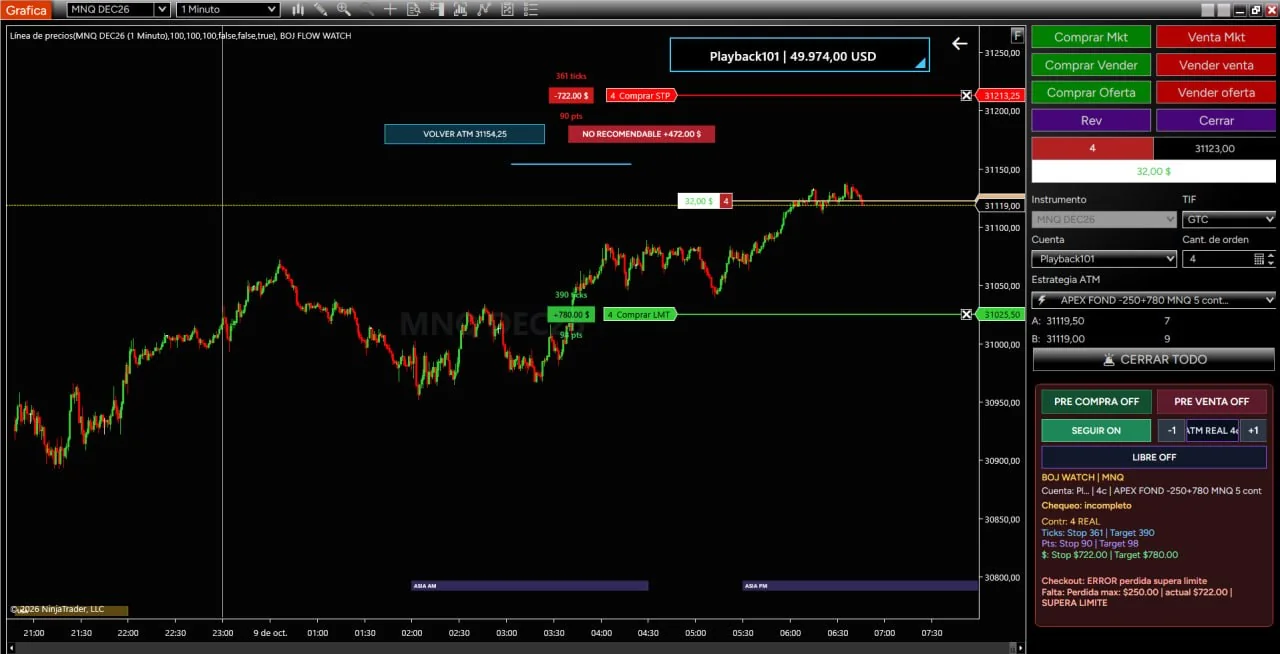
Gráfica con el aviso NO RECOMENDABLE, el botón VOLVER ATM y el Checkout marcando que la pérdida supera el límite
Cuando el stop se va lejos. El plan decía 250 $ de pérdida máxima y el stop está en 722 $. Watch lo marca sobre la gráfica, NO RECOMENDABLE, y el Checkout lo repite: ERROR pérdida supera límite, con las dos cifras. Al lado, VOLVER ATM con el precio al que quedaría el stop. Sigue sin bloquear nada: pide el cambio y espera confirmación, y pulsarlo es decisión tuya. When the stop drifts. The plan said a 250 $ maximum loss and the stop sits at 722 $. Watch flags it on the chart, NO RECOMENDABLE, and the Checkout repeats it: loss over the limit, with both figures. Beside it, VOLVER ATM with the price the stop would return to. It still blocks nothing: it requests the change and waits for confirmation, and pressing it is your call.

Gratis, con licencia de NinjaTraderFree, licensed through NinjaTrader

Descargar BOJ Flow WatchDownload BOJ Flow Watch

BOJ Flow Watch es gratuito, pero no es un archivo que se baja y ya. Se distribuye con NinjaTrader Vendor Licensing: la licencia va asociada al correo de tu cuenta de NinjaTrader y la activamos nosotros. El archivo lo descargas ahora; hasta que activemos tu licencia, el indicador se instala pero no carga. BOJ Flow Watch is free, but it is not a file you just download and run. It is distributed under NinjaTrader Vendor Licensing: the licence is tied to the email of your NinjaTrader account and we activate it. You download the file now; until we activate your licence, the indicator installs but does not load.

  • 1. Rellenas el formulario con el correo con el que entras en NinjaTrader.1. Fill in the form with the email you use to sign in to NinjaTrader.
  • 2. Descargas el paquete al momento, con los manuales, y lo instalas con su instalador de Windows o importando el ZIP incluido, a tu elección. No hay que compilar nada.2. Download the package right away, with the manuals, and install it with its Windows installer or by importing the included ZIP, your choice. Nothing to compile.
  • 3. Activamos tu licencia en menos de 24 horas y te lo confirmamos por correo.3. We activate your licence within 24 hours and confirm it by email.
  • 4. Reinicias NinjaTrader y añades BOJ FLOW WATCH a la gráfica.4. Restart NinjaTrader and add BOJ FLOW WATCH to your chart.
RequisitosRequirements NinjaTrader 8.1.8.4 o superior, con una cuenta de NinjaTrader activaNinjaTrader 8.1.8.4 or later, with an active NinjaTrader account
Los manuales, antes de descargarThe manuals, before you download

Puedes leerlos ahora, sin dejar ningún correo: instalación, actualización, uso y solución de problemas, de la versión 1.0.4.4. Van también dentro de la descarga y en tu panel. You can read them now, without leaving an email: installation, updating, use and troubleshooting, for version 1.0.4.4. They also come inside the download and sit in your account.

El detalle que más fallaThe one thing that goes wrong

Si nos das un correo distinto del de tu cuenta de NinjaTrader, la licencia se activa pero el indicador no la encuentra. Comprueba cuál usas antes de enviar.If you give us an email other than the one on your NinjaTrader account, the licence gets activated but the indicator cannot find it. Check which one you use before sending.

Descargar BOJ Flow WatchDownload BOJ Flow Watch

¿Ya tienes BOJ Flow Watch? Entra en tu cuenta para descargar las actualizaciones; no hace falta volver a rellenar el formulario.Already have BOJ Flow Watch? Sign in to your account to download updates; no need to fill in the form again.

BOJ Flow Watch muestra información y avisa. No opera por ti ni sustituye tu criterio. La licencia es personal y no se puede ceder. BOJ Flow Watch shows information and warns you. It does not trade for you or replace your judgement. The licence is personal and cannot be transferred.

Un proceso visual y ordenadoA visual, orderly process

Cómo funcionaHow it works

La herramienta ordena información dentro de NinjaTrader 8. La decisión sigue siendo del operador.The tool organises information inside NinjaTrader 8. The decision remains the trader's.

1. Observa1. Observe

Noticias, sesiones y avisos, sobre la gráfica y sin cambiar de ventana.News, sessions and alerts, on the chart, without switching windows.

2. Contextualiza2. Put it in context

Relacionas lo que ves con el momento de la sesión y los eventos que vienen.You relate what you see to the moment in the session and the events ahead.

3. Comprueba3. Check

Cuenta, mercado, riesgo y contratos: ¿es lo que habías decidido?Account, market, risk and contracts: is this what you had decided?

4. Decides4. You decide

Entras, esperas o lo dejas pasar. Con tu criterio y tu gestión del riesgo.You enter, wait or let it go. With your own judgement and risk management.

Información, contexto y disciplina. No promesas.Information, context and discipline. Not promises.

BOJ Flow Suite no pretende decirte qué hacer. Pretende ayudarte a entender mejor dónde estás. No sustituye al operador ni garantiza resultados: ordena información, reduce ruido visual y facilita una lectura más tranquila del mercado. BOJ Flow Suite does not aim to tell you what to do. It aims to help you understand better where you are. It does not replace the trader or guarantee results: it organises information, reduces visual noise and makes for a calmer reading of the market.

Lo que necesitas para usarloWhat you need to use it

Plataforma y datosPlatform and data

BOJ Flow Suite funciona dentro de NinjaTrader 8. Si aún no lo tienes, estos son los dos únicos requisitos.BOJ Flow Suite runs inside NinjaTrader 8. If you don't have it yet, these are the only two requirements.

La plataforma que recomendamosThe platform we recommend

Es la plataforma sobre la que corre la suite. Descargarla es gratis y te da acceso a:It is the platform the suite runs on. Downloading it is free and gives you access to:

  • Simulación con datos de futuros en tiempo realSimulated trading with real-time futures data
  • Gráficas avanzadas, con operativa desde el propio gráficoAdvanced charting, with trading directly from the chart
  • Backtesting sobre datos históricosBacktesting on historical data
  • Gestión de órdenes con stops, objetivos y trailing automáticosOrder management with automatic stops, targets and trailing stops
Descargar NinjaTrader gratisDownload NinjaTrader for free

Los datos de mercadoMarket data

Kinetick es el servicio de datos recomendado por NinjaTrader. Da cotizaciones sin filtrar de acciones, futuros y forex, y datos históricos de fin de día gratuitos desde la propia plataforma.Kinetick is the market data service recommended by NinjaTrader. It provides unfiltered quotes for stocks, futures and forex, plus free end-of-day historical data straight from the platform.

Para probar la suite con datos históricos no necesitas pagar nada.To try the suite on historical data you do not need to pay anything.

Empezar con datos gratuitosStart with free data

NinjaTrader nos compensa si descargas la plataforma desde nuestro enlace. A ti no te cuesta más por ello. NinjaTrader compensates us if you download the platform through our link. It costs you nothing extra.

El proyecto y quien hay detrásThe project and the people behind it

Sobre BOJ Flow SuiteAbout BOJ Flow Suite

BOJ Flow Suite está desarrollado por Manuel Boj y su hija, Chari Boj. Nace de usar NinjaTrader 8 a diario, de ver qué falta cuando estás delante de la gráfica, y de un trabajo continuo de prueba, corrección y mejora. BOJ Flow Suite is developed by Manuel Boj and his daughter, Chari Boj. It comes from using NinjaTrader 8 every day, from seeing what is missing when you are in front of the chart, and from continuous testing, fixing and improving.

Lo que se añade se añade porque hace falta, no porque quede bien en una lista de funciones. What gets added gets added because it is needed, not because it looks good on a feature list.

Preguntas frecuentesFAQ

Lo que más nos preguntan sobre BOJ Flow WatchWhat people ask us most about BOJ Flow Watch

¿BOJ Flow Watch es de verdad gratis?Is BOJ Flow Watch really free?

Sí, es gratuito. Pero no es un archivo que se baja y ya: se distribuye con NinjaTrader Vendor Licensing, así que la licencia va asociada al correo de tu cuenta de NinjaTrader y la activamos nosotros.Yes, it is free. But it is not a file you just download and use: it is distributed under NinjaTrader Vendor Licensing, so the licence is tied to the email of your NinjaTrader account and we activate it for you.

¿Qué correo tengo que poner en el formulario?Which email should I use in the form?

El correo con el que inicias sesión en NinjaTrader. Si nos das otro, la licencia se activa pero el indicador no la encuentra.The email you sign in to NinjaTrader with. If you give us a different one, the licence is activated but the indicator cannot find it.

¿Cuánto tarda en funcionar?How long until it works?

El archivo lo descargas al momento y activamos tu licencia en menos de 24 horas, con confirmación por correo. Hasta entonces el indicador se instala, pero no carga. Cuando te lo confirmemos, reinicias NinjaTrader y añades BOJ FLOW WATCH a la gráfica.You download the file right away and we activate your licence within 24 hours, confirming by email. Until then the indicator installs but does not load. Once we confirm, restart NinjaTrader and add BOJ FLOW WATCH to the chart.

¿Qué necesito para usarlo?What do I need to use it?

NinjaTrader 8.1.8.4 o superior, con una cuenta de NinjaTrader activa. Para probarlo con datos históricos no necesitas pagar nada.NinjaTrader 8.1.8.4 or later, with an active NinjaTrader account. To try it with historical data you do not need to pay anything.

¿Opera por mí o me da señales?Does it trade for me or give me signals?

No. Muestra información y avisa. No envía órdenes, no da señales de compra o venta y no sustituye tu criterio. El Inspector avisa, no bloquea: la decisión sigue siendo tuya.No. It shows information and warns you. It does not send orders, does not give buy or sell signals and does not replace your judgement. The Inspector warns, it does not block: the decision is still yours.

¿De dónde salen las noticias económicas?Where does the economic news come from?

De organismos oficiales, no de un calendario de terceros: BLS, BEA y la Reserva Federal/FOMC. Se actualizan solas cada cierto tiempo y puedes combinarlas con un CSV propio.From official bodies, not a third-party calendar: BLS, BEA and the Federal Reserve/FOMC. They update on their own every so often and you can combine them with your own CSV.

¿Qué es el Inspector?What is the Inspector?

Escribes una vez lo que habías decidido operar (cuenta, mercado, pérdida máxima, profit mínimo y contratos) y el Inspector lo compara con lo que tienes puesto en NinjaTrader. Te dice línea a línea si coincide y, si no, cuál es el error.You write down once what you had decided to trade (account, market, maximum loss, minimum profit and contracts) and the Inspector compares it with what you have set in NinjaTrader. It tells you line by line whether it matches and, if not, what the mistake is.

¿Cómo lo instalo y cómo lo actualizo?How do I install and update it?

Con el instalador de Windows o importando el ZIP incluido, sin compilar nada. Los manuales de la versión 1.0.4.4 están abiertos, sin dejar correo. Para actualizar, entra en tu cuenta y descarga la nueva versión: no hace falta volver a rellenar el formulario.With the Windows installer or by importing the included ZIP, with nothing to compile. The version 1.0.4.4 manuals are open, no email needed. To update, sign in to your account and download the new version: you do not need to fill in the form again.

¿Qué son Companion Live y Companion Journal? ¿Cuándo salen?What are Companion Live and Companion Journal? When are they coming?

Son las dos versiones de pago de la suite. Funcionan y están en fase avanzada de validación interna, pero todavía no hay fecha ni precio. Si te apuntas a la lista de espera, te escribimos un solo correo el día que salgan, con el precio y las funciones definitivas.They are the two paid versions of the suite. They work and are in an advanced stage of internal validation, but there is no date or price yet. If you join the waiting list, we send you a single email the day they come out, with the final price and features.
¿No está tu duda? Escríbela más abajo, en Pregúntanos, o mira las preguntas publicadas.Is your question not here? Write it below, in Ask us, or see the published questions.

PregúntanosAsk us

Las preguntas que nos hacéis, respondidasThe questions you ask us, answered

Cualquier duda sobre NinjaTrader, sobre BOJ Flow Watch, sobre empezar en simulado o sobre cuentas de fondeo. Nos la mandas con tu correo, te contestamos a ti directamente y, si puede servirle a más gente, la publicamos con la respuesta en la página de preguntas. Solo tu nombre de pila, nunca tu correo.Any question about NinjaTrader, BOJ Flow Watch, starting in simulation or prop-firm accounts. Send it with your email, we reply to you directly and, if it can help others, we publish it with the answer on the questions page. First name only, never your email.

Lo que no respondemosWhat we don't answer

Si entrar o salir de una operación concreta, previsiones de mercado, señales o consejos de inversión. No somos asesores: mostramos y explicamos, y la decisión es siempre tuya.Whether to enter or exit a specific trade, market forecasts, signals or investment advice. We are not advisors: we show and explain, and the decision is always yours.

Ver las preguntas publicadasSee the published questions

Escribe tu preguntaWrite your question

Ayuda y avisosHelp and updates

Soporte, instalación y novedadesSupport, installation and updates

Escríbenos para dudas sobre instalación, licencia, funcionamiento o documentación, o cualquier otra cosa (para Companion Live y Journal hay una lista de espera). Respondemos desde el correo corporativo.Write to us with questions about installation, licensing, how it works or documentation, or anything else (for Companion Live and Journal there is a waiting list). We reply from our corporate address.

Correo corporativoCorporate email contacto@bojflowsuite.com
ComunidadCommunity

También puedes unirte al grupo de Telegram para resolver dudas, seguir novedades y comentar con otros usuarios.You can also join the Telegram group to ask questions, follow updates and talk with other users.

Unirse a TelegramJoin Telegram

Envíanos tu consultaSend us your question